Chapter 6: The toolchain
Look inside a typical firmware build directory: object files, an ELF, perhaps a raw binary. They all came from the project, but they are not interchangeable copies. One still needs linking. Another contains addresses and debugging information. The raw file has shed much of that information, even though it contains the bytes we may eventually load.
The Build button in an MCU IDE collected those steps for you. Here the examples separate them so their results can be inspected. A tiny Linux-target program and a build-only bare-metal skeleton have different startup and linking contracts. Neither example requires board execution or completion of a build to follow the explanation. One small variable in the skeleton gives us a particularly useful question: how can it occupy four bytes in RAM without storing those four initialization bytes in the raw image?
6.1 gcc is not one program
Keep the application small enough that it cannot hide the build process from us. Source Chapter 3’s environment file, make a directory for the experiment, and open hello.c:
$ . ~/imx6ull/scripts/env.sh
$ mkdir -p ~/imx6ull/src/ch06-hello
$ cd ~/imx6ull/src/ch06-hello
$ nano hello.c
Save this complete source:
#include <stdio.h>
int main(void) { puts("hello"); return 0; }
Build it for Arm Linux with the Linux-target compiler. We will inspect this result on the PC, not run it directly on the x86_64 host:
$ arm-none-linux-gnueabihf-gcc -O2 -o hello hello.c
$ echo $?
Run one command at a time. Immediately after GCC, echo $? prints its exit status: 0 means success; a nonzero value means the build failed. If it fails, stop and fix the first error before inspecting hello; an older file can remain after a failed rebuild. Chapter 3’s pinned Linux compiler defaults to an Armv7-A instruction set suitable for this small Cortex-A7 example. The bare-metal build below selects its CPU and ABI explicitly.
We gave the terminal one command and got one file, hello. That tidy exchange hides several stages. The gcc command is a driver: it selects tools and passes each stage’s result onward. The finished file uses ELF, the Executable and Linkable Format. It describes the target and layout as well as carrying the code. It is not just a sequence of the instructions for main().
The main build stages are:
Preprocessing. Resolves
#include, expands macros, and normally strips comments. GCC commonly performs this insidecc1, rather than launching a separatecpp. Try-Eto inspect expanded C; its output retains source-location markers and may retain pragmas.cc1, the C compiler proper. Parses C, builds an internal IR (RTL/GIMPLE), optimizes, lowers to target assembly. Output: a.sfile. Try-Sto stop here.as(from binutils), assembler. Turns.sinto a relocatable.o(ELF object file). Try-cto stop here.Linking.
ld(from binutils) combines.ofiles and libraries, resolves symbol references, applies the linker script’s address layout, and writes the final ELF executable. This GCC build may invoke it throughcollect2, a wrapper that also helps arrange constructor initialization; that is not a separate build stage.
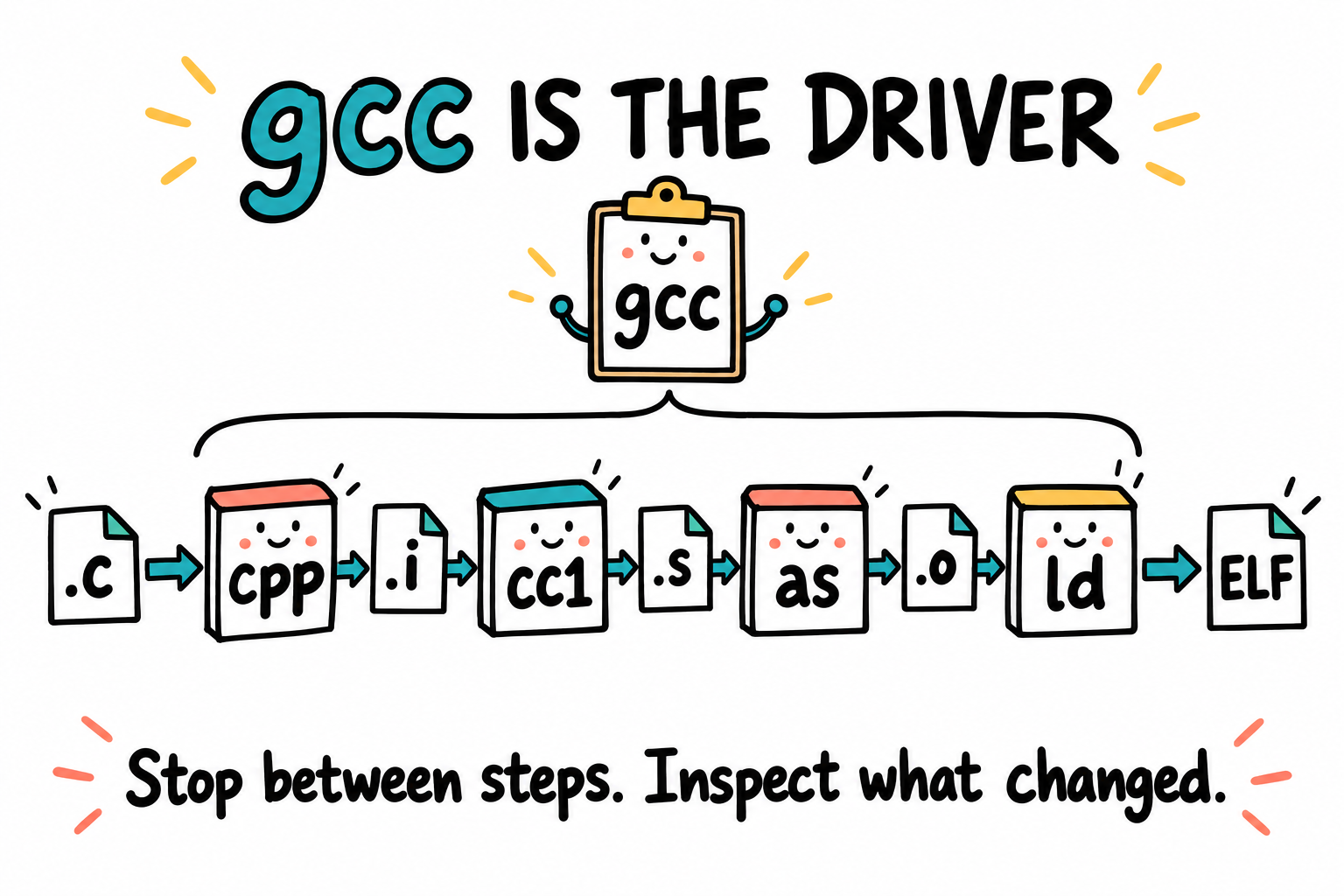
The Build button had a team behind it. This is a map of stages, not a promise of four separate processes: cc1 can also perform preprocessing, and a GCC build may invoke the linker through collect2. Intermediate files may be temporary unless we ask the driver to stop or save them.
For a dynamically linked program, the final ELF also names a dynamic loader. That loader runs later on the target when the program starts. It is not a stage of the host compile command.
To see the commands actually executed, rebuild with -v and save the complete diagnostic stream:
$ arm-none-linux-gnueabihf-gcc -v -O2 -o hello hello.c 2> hello-build.log
$ echo $?
$ less hello-build.log
2> sends standard error, where GCC writes diagnostics and verbose commands, to the named file. Check the exit status before continuing: on failure, read the log to find the first error, then fix it and rebuild. In less, scroll through the complete log and press q to return to the shell. Find the cc1, as, and collect2/linker command lines; the compiler’s identity banner alone does not show the chain. Do not pipe a live build into head: closing its output early can interrupt the build.
For a command plan without compiling, use arm-none-linux-gnueabihf-gcc -### -O2 -o hello hello.c. It prints the selected commands but creates no new executable. See GCC’s overall options.
The distinction becomes useful the first time a build fails. A missing header points toward preprocessing or compilation. An undefined function reference points toward linking: the compiler may already have produced a valid object, but the linker could not find the function’s implementation. Before changing flags, find which stage actually stopped.
6.2 The binutils inventory
An executable is no longer editable C, but it is not beyond inspection. Binutils supplies tools that assemble, link, convert, and examine binary files. Want to know where _start ended up? Ask nm. Want the instructions? Ask objdump. The prefix selects the target family, just as it did for GCC. The table collects these tools for later lookup:
Tool |
What it does |
When you reach for it |
|---|---|---|
|
Assemble |
Usually invoked through |
|
Link object files and libraries into an ELF |
Bare-metal builds using |
|
Convert formats and extract sections |
Convert an ELF into a raw binary |
|
Disassemble code and display headers or sections |
Inspect generated instructions |
|
List symbols in an object |
Find where a symbol is defined or exported |
|
Display ELF metadata |
Inspect sections, segments, and dynamic information |
|
Remove symbols/debug info |
Producing the shipped binary. |
|
Build/dissect |
When making your own libs. |
|
Map address → file:line |
Decoding crash addresses, oopses. |
|
Print section sizes |
Quick sanity check on memory budget. |
There are two example artifacts in this chapter: the Linux hello from Section 6.1 and led.elf from the build-only skeleton. The inspection commands assume the corresponding successful build. They describe the artifacts’ interfaces, not a prerequisite for continuing to read.
objdump -d on the build-only skeleton
$ cd ~/imx6ull/src/ch06-skeleton
$ arm-none-eabi-objdump -d led.elf
In this skeleton’s disassembly, _start belongs at 0x00908000. The stack-pointer setup, BSS-clearing loop, and branch to main come from the startup source in Section 6.4.1. Exact instruction addresses and bytes depend on the build; they need not match a representative listing from another build.
readelf -l to see segments
$ cd ~/imx6ull/src/ch06-hello
$ arm-none-linux-gnueabihf-readelf -l hello
Find the LOAD rows and, for a dynamically linked result, the INTERP row. The output identifies the required interpreter, commonly /lib/ld-linux-armhf.so.3 for this glibc hard-float target. Record the actual output; header counts/addresses vary with toolchain options.
That INTERP filename explains one otherwise puzzling failure: an executable can be present on the board and still fail to start because the loader it requests is missing. The target kernel needs that loader to arrange shared libraries before startup reaches main. Successfully producing the executable did not supply the target’s whole runtime.
Our bare-metal ELF has no INTERP segment. There is no Linux loader to prepare its runtime. We must arrange startup ourselves, and the boot image must tell the ROM where to enter that code.
6.3 Section, segment, VMA, LMA
The inspection tools seem to disagree about the shape of our file. One lists .text and .bss; another lists LOAD segments. They are looking at it for different jobs. The linker organizes contents, while a loader needs ranges of memory to prepare. Keep those two readers of the file in mind as we distinguish sections, segments, and the addresses called VMA and LMA.
Word |
Who mainly cares? |
Meaning |
|---|---|---|
Section |
Compiler and linker |
A named bucket of related bytes: |
Segment |
Loader |
An ELF program-header description. |
VMA, virtual memory address |
CPU at runtime |
The memory address the code/data expects to have when it is being used. |
LMA, load memory address |
Loader/startup code |
The memory address at which the section’s initial bytes are loaded or stored, possibly different from its runtime address. |
If you come from MCU work, start with sections. You already know these:
.text: executable instructions..rodata: constants and string literals..data: globals/statics with non-zero initial values, such asint led = 1;..bss: globals/statics that start as zero, such asint counter;.
There is a clue to the opening variable puzzle in that list. .bss describes zero-initialized storage; it does not need to store one zero byte for every runtime byte. Something at startup must make the storage zero. The linker arranges these sections, while the loader works with larger ranges it can load or map with permissions.
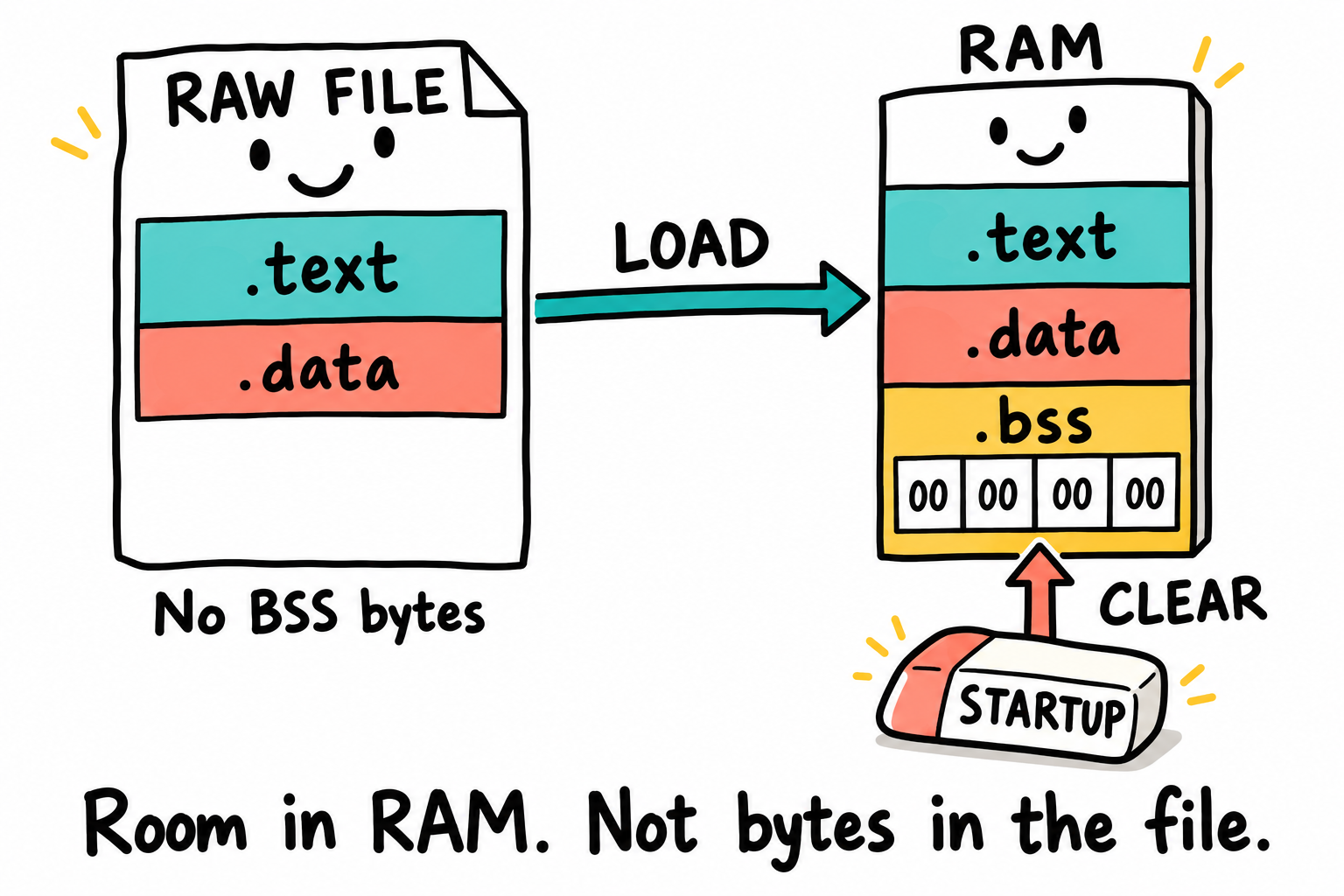
Startup clears the counter’s four RAM bytes. In this raw bare-metal workflow, the ROM loads bytes but does not read an ELF .bss description to clear that storage. The pictured .data is an example of initialized data. The build-only skeleton’s counter-only program has none. The labels name byte ranges, not a section table stored in the raw file.
Put those sections beside a possible Linux loader layout:
sections:  .text  .rodata  .data  .bss  .debug_*
             |       |       |      |
             v       v       v      v
segments:  LOAD R-X        LOAD RW       debug is not loaded
So a segment is the loader’s view. For a Linux process, the kernel and dynamic linker use the ELF program headers to create mappings for LOAD segments. Our raw bare-metal image takes a different route: objcopy extracts bytes from the ELF, and the ROM image wrapper supplies the loading information. The ROM does not read our ELF section table.
Now separate the two address questions:
VMA answers: “Where will this section live when the CPU uses it?”
LMA answers: “At what memory address are the initial bytes loaded or stored?”
A file offset is a different coordinate: it locates bytes inside a stored file. Neither VMA nor LMA is a file offset. For example, .data can have an LMA in MCU Flash and a VMA in RAM; the ELF has its own file offset for those initial bytes. See GNU ld’s basic concepts.
In a Linux process, a VMA is normally a virtual address. In early bare-metal code, before the MMU is enabled, it is usually the physical address from which the CPU executes or accesses data. For this chapter, think of VMA as the runtime address.
Simple OCRAM code can have VMA = LMA. In the first-image layout, the IVT is at 0x00907400, but code begins at 0x00908000. The header is not the first instruction:
image in OCRAM:
  IVT    at 0x00907400, not executable code
  .text  VMA = LMA = 0x00908000
  .data  VMA = LMA = its linked address after code/constants
The distinction becomes useful when where bytes are stored differs from where they are used. A familiar Cortex-M Flash-and-RAM project already has such a case:
Flash image                         RAM after startup
-----------                         -----------------
.text   runs from Flash             .data  variables live here
.rodata stays in Flash              .bss   zeroed here
.data  initial values  ----copy---> .data  runtime values
For .data in that system:
Address kind |
Example meaning |
|---|---|
VMA |
RAM address where |
LMA |
Flash address where the initial value of |
That is why Flash/RAM startup copies .data from LMA to VMA, then zeros .bss. AT(addr) gives a section a different load address. Our OCRAM-only skeleton does not need that copy: its initialized data is loaded at its runtime address. Later OCRAM-to-DDR relocation makes the distinction useful again.
objdump -h displays VMA and LMA side by side. They agree for this OCRAM skeleton; later relocation into DDR may require them to differ. Its output also exposes a third coordinate, the ELF file offset:
Coordinate |
Where the first code byte is |
|---|---|
ELF file offset |
The |
Raw |
|
Wrapped |
|
Runtime memory address |
|
6.4 Linker scripts
A linker script (.ld file) is a small text file that tells ld:
What memory regions exist and their attributes.
Which sections go into which regions.
Where the entry point is.
What symbols to export (
_etext,_sdata,_edata,_sbss,_ebss).
This complete link.ld is one input to the build-only skeleton. It aligns code with Chapter 9’s entry address but does not create a ROM header:
ENTRY(_start)

MEMORY
{
    OCRAM (rwx) : ORIGIN = 0x00908000, LENGTH = 0x0000F800
    STACK (rw)  : ORIGIN = 0x00917800, LENGTH = 0x00000800
}

SECTIONS
{
    .text   : { KEEP(*(.text.startup)) *(.text*) } > OCRAM
    .rodata : { *(.rodata*) } > OCRAM
    .data   : { *(.data*) } > OCRAM
    .bss (NOLOAD) :
    {
        . = ALIGN(4);
        _sbss = .;
        *(.bss*) *(COMMON)
        . = ALIGN(4);
        _ebss = .;
    } > OCRAM

    _image_end = .;
    _stack_limit = ORIGIN(STACK);
    _stack_top = ORIGIN(STACK) + LENGTH(STACK);
    ASSERT(_image_end <= _stack_limit, "Image overlaps reserved stack")
}
Read the script from top to bottom. ENTRY(_start) records the entry symbol for ELF tools and debuggers. Later, the Boot ROM will use the image header’s IVT entry instead, so the two descriptions must agree about where our code begins.
MEMORY divides the available space into a 62 KiB code/data region starting at 0x00908000 and a separate 2 KiB stack region starting at 0x00917800. The stack ends at 0x00918000, the ROM-active free-window limit from Chapter 5. Headers and padding belong below the code; the physical OCRAM extending above that limit is still in use by the ROM during loading.
SECTIONS places input sections into the output. > OCRAM assigns them to successive addresses in our OCRAM region. Within BSS, the dot means the current placement address, so _sbss = .; and _ebss = .; give startup the bounds it must clear.
Naming _stack_top does not reserve memory by itself. The separate memory budget and ASSERT do the important work of keeping linked sections out of the downward-growing stack’s region. A larger program that crosses the limit should fail at link time, where we can read the error, rather than first reveal the overlap as strange behavior on the board. _stack_top is 8-byte aligned for public function calls, and the BSS bounds are aligned for clearing whole words.
6.4.1 A build-only startup skeleton
The skeleton increments a variable rather than operating an LED. It supplies instructions, startup work, and a BSS object to explain the file-versus-memory distinction. Its four input files belong together in the example directory ~/imx6ull/src/ch06-skeleton: link.ld above, startup.S and main.c below, and the complete Makefile in Section 6.7.8. No generated file from an earlier assignment is required.
The example names its outputs led.elf and led.bin to match the later image discussion. The name does not imply LED behavior. With Chapter 3’s terminal-local environment selected, make in this directory would assemble and compile the sources, link the ELF, and extract the raw binary. The preceding Make syntax fragments are not additional input files.
startup.S establishes the limited C-entry contract modeled here:
.syntax unified
.cpu cortex-a7
.arm
.section .text.startup, "ax"
.global _start
_start:
    cpsid   if
    ldr     sp, =_stack_top
    ldr     r0, =_sbss
    ldr     r1, =_ebss
    mov     r2, #0
1:
    cmp     r0, r1
    bhs     2f
    str     r2, [r0], #4
    b       1b
2:
    bl      main
3:
    b       3b
.ltorg
First, cpsid if masks IRQ/FIQ and the first ldr sets SP to the linker-defined stack address. The next loads obtain the BSS bounds, and mov supplies the zero used to clear it. The loop compares the current address with _ebss and clears one word at a time. Numeric labels can be reused: 1b means the previous label 1, while 2f means the next label 2.
Finally, bl main calls C and places a return address in LR. If the function returns, the last branch loops in place. .ltorg emits the literal constants needed by the address loads. The linker script’s alignment and bounds are therefore an interface used by startup, not merely reporting symbols.
main.c supplies the zero-initialized object:
volatile unsigned int counter;
int main(void)
{
    while (1) {
        counter++;
    }
}
For this target, counter occupies four bytes in BSS. volatile keeps its loads and stores present. Startup supplies the initial zeros, while objcopy supplies no BSS initialization bytes in led.bin. In readelf -lW led.elf, BSS contributes to the loadable range’s MemSiz without contributing those four bytes to FileSiz.
This is a build-only skeleton, not a boot candidate. Do not transfer or try to boot led.bin. It has no ROM header, observable LED operation, full exception setup, or complete ROM-handoff normalization. Chapter 9 explains a distinct assembly image and its wrapper.
The minimal linker script can produce an RWX load-segment warning because text and writable BSS share one ELF loadable range. That describes the ELF layout, not hardware permissions or a suitable Linux process layout. A successful link establishes only that these inputs satisfy the selected build rules. A failed rebuild may leave older output files, which are not evidence of its success.
6.5 The ABI: what makes function calls work
Suppose one source file calls a function compiled from another file. The compiler cannot choose argument registers independently for each one. Both sides need the same Application Binary Interface, or ABI. In particular, they must agree on:
Which register contains the first argument? The second? Where do return values live?
Which registers must
bar()preserve, and which can it freely clobber?How is the stack aligned?
Where do floating-point arguments go, in integer registers, or in FPU registers?
How does a function return a structure rather than a single integer?
The EABI (Embedded ABI) for ARM specifies all of this. ARMv7-A Linux uses the AAPCS (ARM Architecture Procedure Call Standard) plus the EABI’s runtime conventions. The relevant variant for us is AAPCS-VFP, also called “hard-float,” in which floating-point parameters use s0-s15 / d0-d7 rather than integer registers.
The core rules (simplified):
Register |
AAPCS role |
|---|---|
r0-r3 |
First four integer arguments / return value ( |
r4-r11 |
Callee-saved (must be preserved). R9 has a platform-specific role; see Chapter 4. |
r12 (ip) |
Intra-procedure-call scratch. Caller-saved. |
r13 (sp) |
Stack pointer. 8-byte aligned at function boundary. |
r14 (lr) |
Link register (return address). |
r15 (pc) |
Program counter. |
s0-s15 / d0-d7 |
Applicable hard-float arguments/return values; allocation depends on types and signature, with different variadic-call rules. Caller-saved. |
s16-s31 / d8-d15 |
Callee-saved FP. |
Chapter 4 showed that returning to the right instruction is not enough if the interrupted state was damaged. Ordinary function calls have a related, but different, agreement: the caller knows which registers may change and which the callee must preserve. If handwritten assembly overwrites a callee-saved value and returns without restoring it, the caller resumes with the wrong state. Compiled C follows the ABI; our assembly must keep its side of the agreement too.
Hard-float vs soft-float
Floating-point options describe both the instructions used and how arguments cross a function boundary. GCC provides three selections:
soft-float (
-mfloat-abi=soft) uses software floating-point operations and the base calling convention, with floating-point arguments passed through core registers or the stack as applicable.softfp (
-mfloat-abi=softfp) permits hardware floating-point instructions while retaining the base calling convention.hard-float (
-mfloat-abi=hard) permits hardware instructions and uses the VFP calling-convention variant for applicable arguments.
The practical difference is compatibility, not a promise that one option always makes a program faster. See GCC’s Arm floating-point options.
The Linux triplet suffix normally distinguishes gnueabi from hard-float gnueabihf. Objects/libraries with incompatible floating-point calling conventions must not be combined; the linker often diagnoses their attributes. A prefix alone does not prove that every freestanding object is incompatible. Check readelf -A and the matching runtime, and use one consistent compiler/ABI selection per build.
The Linux toolchain selected for this book uses the hard-float ABI. All Linux user-space objects and libraries that we combine must use the same ABI.
6.6 The C library, or its absence
Where did the code for puts() come from? We wrote a call and included a header, but supplied no function body. The header provided declarations, and a library provided the implementation. That arrangement is convenient for Linux user space. Our first bare-metal program has no operating system or runtime prepared for such a call, so Part II begins with no libc. Later we write the small memcpy and printf routines our experiments need.
The C library, or libc, is separate from GCC. GCC is the compiler driver and compiler. Libc is a runtime library plus headers that the compiler links against when you build Linux user-space programs. A complete cross-toolchain usually ships all of these together:
Piece |
Example |
Job |
|---|---|---|
Compiler |
|
Turns C into object files. |
Binutils |
|
Assembles, links, converts, and inspects binaries. |
libc headers |
|
Tell the compiler what user-space APIs look like. |
libc binaries |
|
Provide the code that implements the C/POSIX runtime. |
libgcc |
|
Small helper routines that GCC itself may need, such as integer division helpers. |
The Linux-target headers and libraries live in the toolchain’s sysroot, a directory resembling a target root filesystem. Glibc is packaged alongside our official Arm compiler, not inside its executable. Inspect the selected installation with arm-none-linux-gnueabihf-gcc -print-sysroot and -print-file-name=libc.a.
For Linux user-space code, we use a libc. Three options:
libc |
Notes |
|---|---|
glibc |
Common on general-purpose Linux distributions. Broad compatibility. |
musl |
Small, MIT-licensed implementation often used in compact systems. |
uClibc-ng |
Maintained fork of uClibc, available in Buildroot and used by some embedded distributions. |
The selected official Arm Linux archive supplies glibc. Chapter 34 compares libc choices; a musl build needs matching headers/libraries and toolchain configuration, not merely a flag on a glibc build.
What libc actually provides
A libc bundles:
Wrappers around syscalls (
open,read,write,mmap, …) so you can call them as C functions.Memory allocator (
malloc,free, internally callingbrk/mmap).Standard I/O (
fopen,printf), buffered layers atop the syscall wrappers.Math (
sin,sqrt, …), inlibm.so.POSIX threads (
pthread_*), sometimes a separatelibpthread.so, sometimes folded in.Locale, time, network, etc.
Knowing a function’s name is not enough to make it available. In a bare-metal build, malloc, printf, or errno needs an implementation from our code or a deliberately selected library. This is why runtime dependencies matter as much as the target instruction set.
6.7 Make, in working depth
make runs the builds for the bare-metal projects in Part II and for U-Boot, Linux, and Buildroot later in the book. This section explains the parts used by those builds.
The first build is only half the work. On the second build, what changed? If you edited main.c, the startup assembly did not need recompiling. If you edited the linker script, neither object may need recompiling, but the final layout must be recreated. make records those relationships so we do not have to reconstruct the whole command sequence after each edit.
Sections 6.7.1, 6.7.3, and 6.7.4 explain the rules used by the build-only skeleton and its complete Makefile in Section 6.7.8. Variable-assignment variants, functions, conditionals, and parallelism provide later-build reference. The syntax fragments in Sections 6.7.1-6.7.6 are reading examples, not additions to the skeleton’s Makefile.
make decides which build commands need to run. It does not know C, assembly, ELF, or ARM by itself. You teach it:
Which files you want to create.
Which input files each output depends on.
Which shell command creates the output from the inputs.
With those relationships recorded, make can answer: which outputs need to be rebuilt now?
It answers by looking at files and timestamps:
If the output file does not exist, build it.
If an input file is newer than the output file, rebuild it.
If the output exists and all inputs are older, skip it.
For our bare-metal skeleton, the main dependency chain looks like this:
startup.S ──► startup.o ┐
                         ├──► led.elf ──► led.bin
main.c    ──► main.o    ┘
link.ld   ──────────────┘
Follow a change to main.c through the arrows. It reaches main.o, then led.elf, then led.bin; it never reaches startup.o. A change to link.ld enters further along: reuse the objects, but rebuild the linked ELF and raw binary. The complete Makefile also makes both objects and the ELF depend on Makefile itself, so an edited flag rebuilds them. An unchanged second build has no compilation, linking, or conversion to perform.
A Makefile records those dependency relationships and the shell commands that produce each output. make decides whether to run the commands and in what order.
When you run plain make, it reads a file named Makefile in the current directory and builds the first target in that file. In our examples, the first target is usually all, and all depends on the final file we want, such as led.bin.
6.7.1 Rule shape
target ...: prerequisite ...
<TAB>command
<TAB>command
In a rule, the target is the file you want to create. The prerequisites are the files it depends on. The indented commands are the recipe that creates or updates the target.
make builds the target when the target does not exist or when a prerequisite is newer than the target. Recipe commands must be indented with a literal TAB. Spaces do not work.
6.7.2 Variables: four flavors of assignment
CC     = arm-none-linux-gnueabihf-gcc         # 1) recursive ("deferred")
CC    := arm-none-linux-gnueabihf-gcc         # 2) simple ("immediate")
CFLAGS ?= -O2                                 # 3) only if not already set
OBJS  += extra.o                              # 4) append
The two examples show how changing name affects greet. They differ by one character in the assignment:
name = world
greet = hello $(name)
name = there
$(info $(greet))   # prints "hello there"   ← deferred expansion
name := world
greet := hello $(name)
name := there
$(info $(greet))   # prints "hello world"   ← immediate expansion
With =, the reference to name is resolved when greet is used, after name became there. With :=, greet kept the value formed at assignment time, hello world. Our small Makefile uses := where we want that immediate expansion. Larger projects use both deliberately; ask when a value needs to become fixed.
6.7.3 Pattern rules and automatic variables
A pattern rule with % matches every file fitting the pattern:
%.o: %.c
	$(CC) $(CFLAGS) -c -o $@ $<
Inside the recipe, automatic variables carry the per-instance pieces:
Var |
Meaning |
|---|---|
|
The target being built |
|
The first prerequisite |
|
All prerequisites (de-duplicated, space-separated) |
|
All prerequisites (with duplicates) |
|
Prerequisites newer than the target |
|
The stem matched by |
For main.o, the rule substitutes main.c for $< and main.o for $@. The same recipe can then build other C objects without repeating the compiler command for each filename. Together with the assembly rule and final link rule, this is enough for our small project.
6.7.4 Phony targets
.PHONY: all clean install
Tells make that all / clean / install are not filenames. Without .PHONY, a file named clean would make make clean consider the target up to date and skip the recipe. With .PHONY, the recipe always runs.
6.7.5 Useful functions
Larger Makefiles often need to derive one filename list from another. These functions use the form $(name args,...). Keep the table as a reading aid; the complete skeleton below does not require learning every function first.
Function |
What it does |
Example |
|---|---|---|
|
List files matching a glob (no quoting) |
|
|
Pattern substitution |
|
|
Plain string substitution |
|
|
Directory part |
|
|
Filename part |
|
|
Drop the extension |
|
|
Append / prepend |
|
|
Keep / remove matching |
|
|
Sort + de-duplicate |
|
|
Run a shell command, capture stdout |
|
A common idiom collects root-level C files and C files one directory below bsp; it does not search the tree recursively:
SRCS := $(wildcard bsp/*/*.c) $(wildcard *.c)
OBJS := $(patsubst %.c,%.o,$(SRCS))
6.7.6 Conditionals
ifeq ($(ARCH),arm)
  CFLAGS += -mcpu=cortex-a7
else ifeq ($(ARCH),aarch64)
  CFLAGS += -mcpu=cortex-a53
else
  $(error Unsupported ARCH=$(ARCH))
endif

ifdef DEBUG
  CFLAGS += -O0 -g3
else
  CFLAGS += -O2
endif
These Make directives are evaluated when Make reads the file. They are not tab-indented shell recipe commands, and automatic variables such as $@ are not available as recipe-time values there. Compare:
show:
ifeq ($(DEBUG),1)
	@echo debug selected while reading the Makefile
else
	@echo release selected while reading the Makefile
endif
	@if [ -f main.c ]; then echo main.c exists at recipe time; fi
The ifeq/else/endif lines start at column one; the shell if starts with a tab. See GNU Make conditional syntax.
6.7.7 Parallelism
$ make -j$(nproc)            # use all available cores
$ make -j8                    # 8 jobs in parallel
-j lets Make run several ready recipes at once. That can shorten a large build, but each job also needs memory, so use fewer jobs on a small VM. If a build fails only in parallel, check the dependencies: one recipe may be using a file another has not finished creating.
6.7.8 A complete Makefile for the build-only skeleton
This complete Makefile belongs with the three sources defined in Sections 6.4 and 6.4.1. It is a single build description, unlike the preceding syntax fragments. Recipe lines use literal tabs.
CROSS  := arm-none-eabi-
CC     := $(CROSS)gcc
OC     := $(CROSS)objcopy

CFLAGS := -mcpu=cortex-a7 -marm -mfloat-abi=soft \
          -ffreestanding -fno-builtin -fno-pie -fno-stack-protector \
          -fno-unwind-tables -fno-asynchronous-unwind-tables -O2 -g -Wall
LDFLAGS := -nostdlib -Wl,-T,link.ld

SRCS   := startup.S main.c
OBJS   := startup.o main.o

all: led.bin

%.o: %.S Makefile
	$(CC) $(CFLAGS) -MMD -MP -c -o $@ $<

%.o: %.c Makefile
	$(CC) $(CFLAGS) -MMD -MP -c -o $@ $<

led.elf: $(OBJS) link.ld Makefile
	$(CC) $(CFLAGS) $(LDFLAGS) -o $@ $(OBJS)

led.bin: led.elf
	$(OC) -O binary $< $@

clean:
	rm -f startup.o main.o startup.d main.d led.elf led.bin

-include $(OBJS:.o=.d)

.PHONY: all clean
Here the tool selections, flags, and rules finally meet in one file. Follow all to led.bin, then led.elf, then the two objects. The flags explain what environment we are asking the compiler to assume:
-mcpu=cortex-a7: generate code that uses Cortex-A7 features.-marm -mfloat-abi=soft: this integer-only startup skeleton uses ARM instructions and does not enable VFP. Hard-float code generation alone would not enable the hardware in startup.-ffreestanding: “I do not have a hosted C environment.” Disables the assumption thatmainis the standard entry, etc.-fno-builtin: disables compiler’s optimization of calls likeprintfinto special builtins.-fno-pie -fno-stack-protector: do not require a position-independent runtime or stack-check runtime in this freestanding skeleton.-fno-unwind-tables -fno-asynchronous-unwind-tables: no runtime stack-unwinding tables are needed here.-nostdlibis a link option inLDFLAGS: the GCC driver adds no default startup/libc/libgcc.-Wl,-T,link.ldforwards the script selection to its linker. This deliberately uses GCC for linking so a later explicit-lgcccan select its matching runtime.-MMD -MPwrites.dheader dependencies;-includereads them on the next build. A header edit then rebuilds the affected objects.-O2 -g: optimize but keep debug info.-Wall: turn on the warnings everyone should be using.
Adding Makefile as a prerequisite means edits to its flags or recipes invalidate the affected outputs. The source remains the first prerequisite, so $< still means the source file; the link recipe still passes only $(OBJS), not the script or Makefile, to GCC. Make does not compare command-line variable values with the previous build: after changing CFLAGS or CROSS on the command line, run make clean before rebuilding.
6.8 Static vs dynamic linking (for Linux user-space)
Two ways to combine your code with libraries:
Static linking includes the selected library code in the executable at link time. It does not need those libraries as
.sofiles on the target, but the executable is usually larger.Dynamic linking leaves references to shared libraries that must be available on the target. The dynamic loader, such as
/lib/ld-linux-armhf.so.3, resolves them when the process starts.
Linux distributions normally use dynamic linking. Small embedded systems may use either model. Static linking simplifies deployment for a few standalone programs, while dynamic linking saves storage when many programs share the same libraries.
Return to the hello directory before these Linux user-space comparisons. To force static:
$ cd ~/imx6ull/src/ch06-hello
$ arm-none-linux-gnueabihf-gcc -g -static -o hello hello.c
$ file hello
hello: ELF 32-bit LSB executable, ARM, EABI5 version 1 (SYSV),
       statically linked, BuildID[sha1]=..., with debug_info, not stripped
Compare sizes:
$ arm-none-linux-gnueabihf-gcc -g -O2 -o hello-dyn hello.c
$ arm-none-linux-gnueabihf-gcc -g -O2 -static -o hello-stc hello.c
$ ls -l hello-dyn hello-stc
$ arm-none-linux-gnueabihf-strip -o hello-dyn.stripped hello-dyn
$ arm-none-linux-gnueabihf-strip -o hello-stc.stripped hello-stc
$ ls -l hello-dyn.stripped hello-stc.stripped
Check each compile succeeds before using its output. The two builds use matching optimization/debug flags; only the static-link selection differs. strip -o writes separate copies, preserving both debug originals. A static link can also bring debug information from library archives, so an unstripped hello may occupy megabytes while its stripped copy is much smaller. Record both pairs of actual sizes rather than expecting a fixed libc-size baseline. The smaller dynamic executable still relies on shared libraries on the target; include those dependencies in the complete system’s storage budget.
Also keep the target environment in view: a statically-linked Linux program still needs Linux. Some library features still use external files or configuration. -static does not turn hello into firmware that the Boot ROM can start by itself.
6.9 ELF structure needed for this book
An ELF file has:
┌──────────────────────────────┐
│ ELF Header                   │  ← architecture, type (REL/EXEC/DYN), entry point
├──────────────────────────────┤
│ Program Header Table         │  ← segments (loader's view)
├──────────────────────────────┤
│ .text                        │
│ .rodata                      │
│ .data                        │
│ .bss (no actual bytes)       │
│ .symtab, .strtab             │
│ .debug_*  (DWARF)            │
│ ...                          │
├──────────────────────────────┤
│ Section Header Table         │  ← sections (linker/debugger's view)
└──────────────────────────────┘
A few key facts:
Type
REL(relocatable,.o), produced by the assembler, fed to the linker.Type
EXECis an executable type, not proof of static linking: a dynamically linked non-PIE executable can also beEXEC.Type
DYNcan describe a shared library, dynamic PIE, or static PIE. Type and runtime-library dependencies are separate questions..bssoccupies no file bytes. It only declares “give me N bytes of zero at runtime.” The startup code (or the kernel) zeroes it.DWARF is the debug-info format used in
.debug_*sections.gdb,objdump -S, andaddr2lineread it.
Use file for a quick summary, readelf -l for an interpreter/program headers, and readelf -d for dynamic entries/dependencies. readelf -S checks .debug_*; nm checks ordinary symbols. Missing DWARF can simply mean the program was built without -g; it does not prove stripping. See elf(5).
6.10 Key Notes
The GCC driver coordinates preprocessing, compilation, assembly, and linking. A valid object file does not establish that symbol resolution or final placement succeeded, and an old output file can survive a failed rebuild.
Toolchain selection includes target instructions, ABI, and runtime assumptions. Linux
hellouses a libc and Linux services. The bare-metal skeleton supplies its own startup and links without the default runtime. Static Linux linking does not make a program ROM-bootable.ELF sections organize linker content, while program headers describe loader ranges and dependencies. Raw conversion removes this metadata. The ROM wrapper must supply the loading and entry contract independently.
BSS reserves runtime storage without storing its zero initialization bytes in the raw image. The skeleton’s startup owns clearing the linker-defined range before C accesses
counter.VMA, LMA, and file offset are different coordinates. Linker-defined entry and stack bounds constrain placement, but a linker assertion cannot prove runtime stack depth or correct ROM handoff.
AAPCS defines argument locations, saved registers, and stack alignment across independently built code. Floating-point instruction selection and floating-point argument passing are related but distinct compatibility decisions.
Make records dependency edges and timestamps rather than understanding source semantics. Source, header, linker-script, and Makefile dependencies determine what is rebuilt. Command-line flag changes are not automatically compared with a previous invocation.
6.11 Pitfalls
Mixing incompatible toolchain outputs. Keep the book’s Linux and bare-metal builds on their separately selected toolchains. Some freestanding objects can be ABI-compatible across prefixes, but incompatible calling conventions or no-OS runtime dependencies cannot be reused in Linux user space. Check object attributes and required libraries, not just compiler names.
-nostdlibalso removes the automatic libgcc link. If code uses an operation such as 64-bit integer division, GCC may emit a call to__aeabi_uldivmodfromlibgcc. Add-lgccexplicitly after your object files when required.Linker-script order matters. Place a specific startup section before a broader wildcard such as
*(.text*)when startup must appear first. Chapter 9 shows the required ordering..bssmust be zeroed. If startup does not clear.bss, uninitialized globals contain old memory values and program behavior can change between boots.Wrong
-march/-mcpu. Toolchain defaults vary. The bare-metal Makefile explicitly uses-mcpu=cortex-a7for instruction selection and scheduling. The small Linux hello examples use the pinned toolchain’s Armv7-A defaults; for a board-specific project, choose compatible CPU/FPU/ABI flags deliberately rather than assuming another compiler’s defaults match.stripon the binary you wanted to debug. Keep an unstripped copy. A useful convention in your Makefile:$(NAME).elfis unstripped (forgdb/objdump).$(NAME).stripped.elfis the smaller deliverable.
6.12 Going deeper
Linkers and Loaders by John Levine. A detailed explanation of linkers and loaders.
ELF for the Arm Architecture (AAELF32), alongside the generic ELF specification. AAPCS32 defines calling conventions, not the whole ELF format.
The GCC manual, at least the section on language-independent options.
Procedure Call Standard for the Arm Architecture (AAPCS32), ARM IHI 0042.
man 5 elf,man 1 ld,man 8 ld.so.LWN: “How programs get run” (the kernel
execpath. Relevant when you write abinfmt).
The disassembly and linker symbols now locate our first instruction at 0x00908000. Chapter 7 adds the ROM’s loading description and entry address around the raw bytes.