Chapter 21: U-Boot internals
At the => prompt, U-Boot looks like a small terminal. Type a command and it
answers. Behind that simple exchange, the program has already changed its
stack, arranged a heap, moved its code, located its devices, and loaded an
environment.
We do not need to understand all of U-Boot at once. We need a route from a visible result to the code responsible for it. Start with the prompt. Work backward to the runtime that made it possible, then follow one command forward.
Keep the v2026.04 study tree and EVK comparison build from Section 20.4 open. The MINI image from Chapter 19 stays in its separate vendor output directory. We use the newer tree here to learn current source organization and APIs, not to substitute an EVK image for the MINI. Its ROM + DCD route has already made DDR usable before full U-Boot executes. Chapter 20’s SPL route can reach the same full-U-Boot entry through a different earlier stage. Neither route changes the distinction between the linked address and the address at which the relocated program will run.
21.1 The full-U-Boot boot flow, end to end
For the selected ARMv7 build, use this reading map:
vectors.S: _start -> reset
    start.S: CPU setup
        crt0.S: _main
            early stack and global data
            board_init_f
                common/board_f.c: ordered early init calls
            return to crt0.S
            relocate_code, then resume at the relocated label
            vector and final runtime setup, BSS clear
            board_init_r
                common/board_r.c: later init calls
                main_loop -> autoboot or command interpreter
This is a map, not an assembly listing to paste into a port. Conditional
features add work to the actual paths. The useful habit is to locate a name,
read its caller, and check which branch your .config selects.
Two facts will matter throughout the chapter:
On this ARM full-U-Boot path,
board_init_freturns tocrt0.S. The assembly then arranges the relocation handoff.board_init_rreaches the main loop and is not expected to return to an earlier runtime. These two functions do not have identical return behavior.
21.1a The linker script and the named address-range symbols
Before following the CPU, look at the address ranges it will use. The build
preprocesses arch/arm/cpu/u-boot.lds into u-boot.lds in the output directory.
The linked ELF and u-boot.map show the resulting addresses.
$ . ~/imx6ull/scripts/env.sh
$ arm-none-linux-gnueabihf-nm -n ~/imx6ull/build/uboot-evk/u-boot \
    | grep -E '__image_copy_|__rel_dyn_|_image_binary_end|__bss_'
$ arm-none-linux-gnueabihf-readelf -S ~/imx6ull/build/uboot-evk/u-boot
These commands inspect target files on the host. The first filters the symbol list so that the ranges are easy to compare. Read addresses from your output, not a sample map from an unrelated compiler.
Symbol |
Meaning in this ARM linker layout |
|---|---|
|
Beginning of the main image, linked at |
|
End of the region that the normal relocation copy loop copies |
|
Relocation records consumed while fixing the copied image |
|
End marker for the linked binary layout |
|
Runtime zero-initialized storage range |
The EVK text base is 0x87800000. The other values depend on the build.
Also notice an unusual economy in the linker script: BSS overlays the
relocation-table region. These bytes have different jobs at different times.
The relocation records are needed first. BSS is cleared afterward, once that
old role is finished. A simple drawing that places BSS after every file-backed
section misses this lifetime relationship.
This is why the map matters more than a familiar-looking size total. Section
types, overlays, copied ranges, and runtime reservations all contribute to the
memory story.
In this build the overlay also affects the inspection tools: size can report
zero BSS, and nm can mark its boundary symbols with ?. That does not remove
the runtime zeroing job. Check the actual __bss_start/__bss_end range and
the linker section flags rather than treating that one summary column as the
whole memory requirement.
21.2 _start and _main
_start belongs to arch/arm/lib/vectors.S. Its reset vector reaches the
ARMv7 startup in arch/arm/cpu/armv7/start.S. That distinction helps when a
debugger lands at the first instruction and you want to identify the next one.
start.S handles the selected CPU setup and reaches _main in
arch/arm/lib/crt0.S. Early in _main, the code obtains an initial stack
address, aligns it, reserves early memory, establishes r9 as the global-data
pointer, and calls board_init_f.
Global data, struct global_data, is commonly called gd. It holds state
such as memory information, relocation addresses, flags, and pointers to
runtime structures. On this ARM path, a fixed register gives code access to it.
It is not a general substitute for a fully initialized C runtime.
Walking the SP arithmetic for the EVK
The board header uses CFG_SYS_INIT_RAM_ADDR and CFG_SYS_INIT_RAM_SIZE for
OCRAM. include/system-constants.h derives SYS_INIT_SP_ADDR using the
generated global-data size, unless a custom address is selected.
The default relationship is:
initial top = OCRAM base + OCRAM size - GENERATED_GBL_DATA_SIZE
align initial top down to an 8-byte boundary
reserve the selected early allocation pool, if present
reserve struct global_data and align it down to a 16-byte boundary
establish the new SP and gd pointer
Read the generated size in include/generated/generic-asm-offsets.h, the
selected allocation size in .config, and the allocation function in
common/init/board_init.c. Do not assume that GD is always 248 bytes or that
subtracting GD alone gives the final SP. Configuration changes affect both GD
and its neighboring reservations.
The EVK’s code can already be in DDR while this early stack is in OCRAM. Code location and stack location are separate decisions. Later, the framework reserves the final stack and GD in DDR and switches to them.
Early code must respect this limited runtime. Do not introduce ordinary BSS
state into a function just because its name contains init. Follow the entry
path and the moment that storage becomes valid.
21.3 board_init_f and the init-function sequence
Open common/board_f.c and find initcall_run_f. In v2026.04 it is an ordered
sequence of INITCALL(...) operations, with configuration conditions and
events between them. It is not the older init_sequence_f[] array you may see
in another guide.
The macro in include/initcall.h calls the named function. A nonzero result
reports the failed call and stops through hang(). The order therefore tells
you both the dependencies and where an early failure can stop progress.
Use these landmarks rather than trying to memorize the whole function:
Landmark |
Responsibility |
|---|---|
|
Locate U-Boot’s control device tree |
|
Arrange early allocation and driver-model state |
|
Selected architecture, board, and timing setup |
|
Establish early environment state and console access |
|
Make some of the established state visible |
|
Establish available DRAM information for this board path |
Reservation calls |
Plan space for code, heap, board info, GD, FDT, and stacks |
|
Retain the addresses and offset required for the next phase |
For the EVK DCD route, DDR was already initialized by the ROM. dram_init
does not need to replay a generic DDR training recipe. On another platform,
the same hook name may do more. Read the board implementation before assigning
it a universal meaning.
Likewise, env_init is early environment initialization. It does not imply
that the saved MMC environment has already been imported. The later
initr_env path in common/board_r.c handles that normal load/import step.
board_init_f returns with a plan in GD: relocation destination, new stack,
new GD location, and associated reservations. crt0.S then changes SP and GD,
adjusts its return label by the relocation offset, and passes the destination
in r0 to relocate_code.
That return is important. The C function planned the move. The assembly performs the move and resumes execution in the new copy.
21.4 Relocation, the trick that confuses everyone
U-Boot is already in DDR, so why move it again?
The ROM image selected a load location before the full runtime had arranged the board’s memory reservations. The runtime now knows more: usable DRAM, space needed for its heap, device-tree data, stack, and possibly a framebuffer. It can place itself so that later payload loading has a separate workspace.
Relocation does not make every low address automatically safe for the kernel. Loaded images, reserved regions, expansion space, and U-Boot’s own allocations still need a non-overlapping plan.
How relocation works mechanically
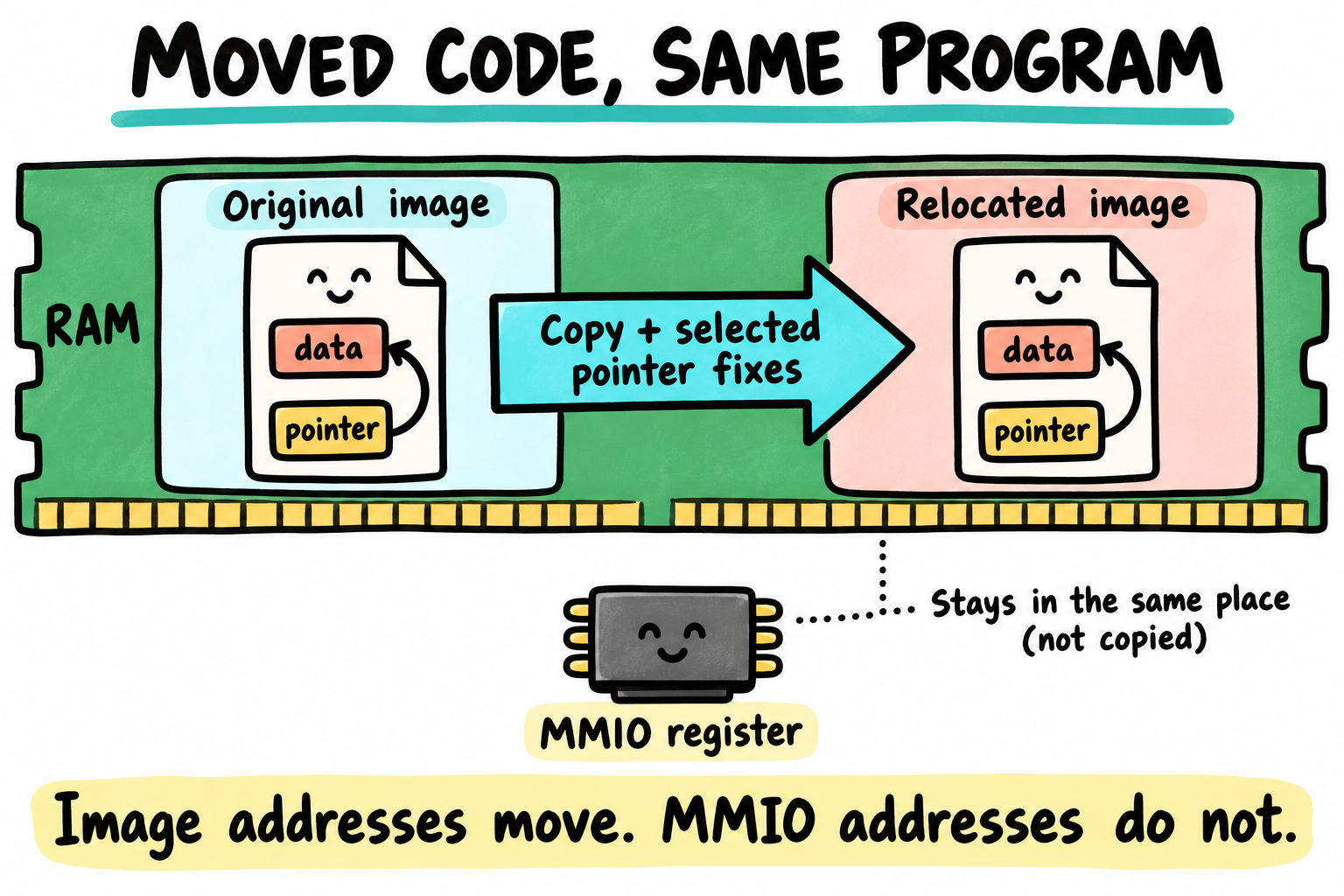
The RAM strip is a conceptual container, not a drawing of the board’s memory hardware. Selected relocation records adjust image-relative addresses. Moving U-Boot does not move the peripheral registers it accesses.
Read arch/arm/lib/relocate.S. At its entry, r0 is the destination. The code
derives the source range from linker-defined offsets, copies
__image_copy_start through __image_copy_end, and walks the relocation
records.
For an R_ARM_RELATIVE record, its work can be expressed as:
new location of the word = old location of the word + relocation offset
new value stored there  = old value stored there + relocation offset
These are two different additions. One finds the word in the copied image. The other corrects the address stored in that word. Not every instruction or arbitrary integer is patched, and not every relocation type is handled the same way. Follow the selected type test in the actual loop.
Finally, the routine returns through the already adjusted link register.
Execution resumes at here in the relocated copy of crt0.S. The selected
runtime setup follows, including BSS clearing, before entering board_init_r.
The linker’s overlay now makes sense: those storage bytes can take on their
later BSS role after the relocation records have been consumed.
What you observe
bdinfo reports relocaddr and reloc off. Compare them with the build’s
CONFIG_TEXT_BASE. For the normal linked-load path, the relationship is:
relocation offset = relocated address - linked address
Do the subtraction using values from your session. Do not compare against
0x80800000 simply because an older board example used that text base.
Also, relocaddr in bdinfo is not automatically an environment variable
named ${relocaddr}. A report field and a shell variable are different things.
There is no need to poke either address to understand the relationship.
Relocation also does not instantly erase the old image. Its bytes can remain until another operation reuses that range. Old bytes are not evidence that the CPU is still executing that copy.
21.5 The command system
Once the shell has parsed a line, command processing finds a registered
command, checks its argument count, and invokes its callback. Trace
common/cli.c, common/command.c, and include/command.h for your selected
parser.
U_BOOT_CMD(...) declares a command entry through U-Boot’s linker-list
mechanism. The linker gathers entries, and find_cmd searches that list.
There is no handwritten central array to update for every command.
Adding a hello command
This small command does no hardware access. We give it a distinctive name,
book_hello, rather than risk colliding with another custom command.
First preserve the pinned revision on a local working branch:
$ cd ~/imx6ull/src/u-boot
$ git switch -c book-uboot-labs
Create cmd/book_hello.c with your editor:
#include <command.h>
#include <stdio.h>

static int do_book_hello(struct cmd_tbl *cmdtp, int flag,
                        int argc, char *const argv[])
{
    if (argc == 2)
        printf("Hello, %s.\n", argv[1]);
    else
        puts("Hello from U-Boot.\n");

    return CMD_RET_SUCCESS;
}

U_BOOT_CMD(
    book_hello, 2, 1, do_book_hello,
    "print a book-lab greeting",
    "[name]"
);
The 2 is the maximum argument count including the command name.
The 1 marks the command repeatable. The callback returns a command status,
which matters when a script uses it inside if.
Add this entry to cmd/Kconfig, beside the other command options:
config CMD_BOOK_HELLO
    bool "book_hello - Print a book-lab greeting"
    depends on CMDLINE
    help
      Enable a greeting command with no hardware side effects.
Add its object selection to cmd/Makefile:
obj-$(CONFIG_CMD_BOOK_HELLO) += book_hello.o
Finally, add CONFIG_CMD_BOOK_HELLO=y to the EVK study defconfig in your
working tree, then rerun the two Section 20.4 EVK build commands with the same
output directory. This edits the configuration input, rather than relying
on a hand-edited generated .config that a later defconfig command replaces.
Only run the resulting board image after the applicable board/image checks. MINI readers can compile and inspect the ELF now, then carry this command into their qualified Chapter 22 port. Expected command behavior is:
=> book_hello
Hello from U-Boot.
=> book_hello reader
Hello, reader.
These are expected strings from the callback, not a claimed board test.
book_hello one two exceeds the registered argument limit and should produce
usage instead. The dispatcher rejects it before the callback runs.
21.6 The environment
The environment has two lives: a set of variables currently in RAM and, when a storage backend is configured, a saved representation that can survive reset. Changing the first does not automatically change the second.
What it is and where it lives
The common stored data uses NUL-separated name=value strings with integrity
metadata such as a CRC. A redundant layout adds its own selection information.
Backend choices include raw MMC storage, flash, filesystems, and other platform
arrangements. The environment does not have to live on the boot medium or
outside every filesystem.
For the EVK reference, the defconfig selects MMC storage, size 0x2000, offset
0xC0000, and default MMC device index 1. The selected runtime device can also
depend on board/SoC hooks. Record the actual backend, device, hardware partition,
offset, size, and any redundant copy before enabling a persistent write.
Compiled defaults may come from a board .env file or settings such as
CFG_EXTRA_ENV_SETTINGS; this EVK uses the latter in include/configs/mx6ullevk.h.
A valid saved environment can replace them. Rebuilding a default value does not
guarantee that an existing board will start using it.
Reading and writing
Try a RAM-only variable first:
=> setenv book_lab visible
=> printenv book_lab
=> setenv book_lab
Giving setenv no value removes that variable. env save or its saveenv
alias is a separate storage operation. For a first experiment, leaving changes
unsaved is deliberate, not an error.
Before a persistence test, inspect the configured storage layout and reserve both environment copies if the build uses redundancy. Use a qualified spare lab device and retain a known-good recovery route. A bad CRC may indicate a blank region, a layout mismatch, corruption, or a failed read; saving over the region is not a general diagnosis.
From U-Boot scripts and from C code
For a harmless script example:
=> setenv book_steps 'echo first; echo second'
=> run book_steps
Single quotes store the command text. ${name} references within such a
stored script are expanded when the script later runs. Chapter 23 uses that
distinction for boot policy. It also explains why a semicolon alone does not
stop a boot sequence after an earlier load fails.
The C interfaces are declared in <env.h>:
const char *ip = env_get("ipaddr");
ulong address = env_get_hex("loadaddr", 0x82000000);
int ret = env_set("autoload", "no");
This is an API illustration, not a complete command. ip can be NULL.
Check ret before relying on a change. An env_get pointer refers to the
environment’s storage; do not retain it across mutations without considering
its lifetime.
From Linux user-space
On the running target, fw_printenv and fw_setenv can use a matching
/etc/fw_env.config to access the saved representation. Their storage device
and byte ranges must match U-Boot’s actual backend and layout, including
redundancy. A guessed configuration can overwrite unrelated data.
These are target Linux tools in this workflow, not an instruction to point a
host PC at whatever /dev/mmcblk0 it happens to have. Chapter 24F returns to
their role in an update policy. A CRC is an integrity check, not authorization
to let an untrusted writer control boot settings.
21.7 The driver model (DM)
Suppose board code needs a UART without knowing which controller implements it. It needs a shared interface, a driver that implements that interface, and an instance representing this particular controller.
Concept |
Example |
|---|---|
|
The instance associated with a selected UART node |
|
The implementation that knows this UART controller |
A uclass, such as |
The category and common operations used by callers |
Device Tree properties and a driver’s compatible table help DM bind an instance to a driver. Binding is not the same as successful probing. Probing activates the device and can fail while obtaining clocks, pads, power, or parent-bus resources. It commonly happens when a caller first needs the device, rather than immediately for every node in the tree.
Read the real UART driver, drivers/serial/serial_mxc.c, and the serial uclass
beside it. Find its compatible table, U_BOOT_DRIVER declaration, private-data
allocation, and operations. Those entries connect framework requests to the
controller behavior you learned in Chapter 12.
Serial operations also have a contract. For example, a nonblocking receive
operation can return -EAGAIN when no character is ready. Returning a fabricated
zero byte instead changes the meaning seen by the caller.
Early DM needs the devices, drivers, data, and allocations appropriate to the pre-relocation stage. A node that is usable later is not automatically usable before relocation. SPL filtering introduces another stage distinction. Follow the actual phase properties and driver flags in the pinned tree.
U-Boot’s control FDT describes devices U-Boot uses. The OS FDT supplied
to a kernel describes that kernel’s hardware view. They may share source
material, but they are separate objects with separate lifetimes. A reported
fdt_blob or fdtcontroladdr is not automatically the blob that bootz passes
to Linux.
21.8 Reading a real boot, end to end
Use your own qualified board log, or study the source without claiming a run. For the modern EVK comparison route, map these kinds of messages to their owners:
Observation |
Source area to inspect |
|---|---|
U-Boot banner |
Early reporting, including |
CPU/model/reset information |
Selected architecture and board-reporting hooks |
DRAM announcement |
|
MMC devices |
Selected MMC initialization and device probes |
Loading a saved environment |
Post-relocation |
Serial input/output selection |
Console initialization and environment choices |
Autoboot countdown |
Main loop and autoboot policy |
|
Command interpreter |
No PMIC message is guaranteed for every board. No Ethernet line proves that a transfer to your server will work. No SPL banner is expected for our no-SPL EVK configuration. Read the messages as observations about the selected path, not a checklist of lines every board must imitate.
When something stops, find the last established dependency. A console that works before relocation and goes quiet afterward suggests a different set of questions from a ROM load that never reaches UART setup.
21.9 Key Notes
The ARM full-U-Boot path divides work between C planning and assembly handoff.
board_init_frecords reservations in GD, thencrt0.Schanges stack/GD and relocates execution.Early stack and global data do not imply a complete C runtime. Generated sizes, alignment and the early allocation pool determine the actual OCRAM footprint.
Relocation copies a defined image range and interprets relocation records. BSS reuses the relocation-table storage only after those records have served their purpose.
Command registration joins a callback, argument/status contract, Kconfig selection and linked object.
U_BOOT_CMDcontributes to linker lists rather than a manually maintained central array.RAM environment, compiled defaults and imported persistent settings are distinct states. Rebuilding defaults neither replaces saved settings nor authorizes a storage write.
Driver-model binding identifies an implementation, while probing acquires and initializes its dependencies. U-Boot’s control FDT remains separate from the OS tree prepared for Linux.
21.10 Pitfalls
Assuming every init hook has the same role on every board. Follow the selected caller, configuration, and implementation together.
Using normal global state too early. Early stack and GD setup do not guarantee that BSS or every writable-data assumption is valid yet.
Patching every integer by
reloc_off. The relocation loop interprets selected records. An MMIO address is not a pointer into U-Boot’s copied image.Expecting new defaults to override a saved environment. Inspect the currently imported values before changing storage or blaming the build.
Confusing control and OS device trees. Do not edit or hand off U-Boot’s active control tree as though it were an unused kernel load buffer.
Registering duplicate command names. Lookup order and abbreviations are not a conflict-resolution mechanism. Choose a distinct name.
Reflashing to clear an environment. The environment often occupies a separate range. Replacing the executable need not replace saved settings.
21.11 Going deeper
Chapter 22 changes the board description. We can now separate what belongs to our MINI from the common runtime that gets every configured board to its prompt.