Chapter 24: Workflows, TFTP, NFS, USB-OTG
Suppose you change one driver and want to try it again. Must that also mean rewriting the bootloader and moving a card between machines? Once a board has a qualified U-Boot and wired Ethernet path, it can load new kernel artifacts into RAM. Linux can then mount a root filesystem served by the host. The bootloader, kernel and userspace no longer have to share one update mechanism.
There is a catch worth understanding before setting this up: U-Boot’s Ethernet driver stops being responsible at kernel handoff. Linux must bring up its own driver, configure its own address and reach the NFS server. A successful TFTP transfer is useful evidence, but it is not evidence that NFS-root will work.
Chapter 19’s first vendor MINI build deliberately disables networking and video: it is a UART/SD/eMMC baseline, not a TFTP bootloader. The pinned vendor header selects SMSC support for older LAN8720A carriers; MINI V2.2 uses SR8201F. Shared core support does not establish a working link.
Network examples here use Chapter 22’s separate upstream v2026.04 migration, commit 88dc2788777babfd6322fa655df549a019aa1e69, with ENET2/address-1 wiring and the source-checked RTL8201F ID-match candidate. They remain optional until actual PHY ID, reset, 50 MHz reference and transfers are validated on this carrier. Keep local storage from Chapter 23 while those tests remain undone.
Target commands also require Chapter 23’s approved RAM plan and matched kernel/DT/rootfs. Modern examples name the kernel imx6ull-pa-mini.dtb; a vendor-kernel set instead may contain imx6ull-alientek-emmc.dtb at another output path. Choose the matched pair explicitly, never rename an EVK or U-Boot control DTB. Without artifacts and board validation, follow host/policy examples and return after Parts IV-V.
Execution boundary: The host checks assume the isolated lab services from Chapter 3 are already configured. Stop if that setup is missing rather than changing unrelated host exports or firewall rules. Target examples are optional until the board and artifacts are qualified. Keep environment edits temporary, preserve a known-good recovery path, and do not write media or change fuses for these examples.
24.1 Three transports, three jobs
Transport |
Job in this workflow |
Important boundary |
|---|---|---|
TFTP, Trivial File Transfer Protocol |
U-Boot retrieves |
No authentication/encryption; load failure must block boot |
NFS, Network File System |
Linux mounts the host’s exported directory as root |
Needs Linux drivers and server access before userspace exists |
USB serial download using |
ROM loads a board-compatible recovery bootloader |
Later script steps may write persistent media; not automatically RAM-only |
U-Boot itself may still come from SD/eMMC. Both the selected vendor core recipe and modern candidate use ROM+DCD followed by full U-Boot: no SPL in these configs. A network-loaded kernel does not remove the need for a valid first-stage image or a separately qualified USB recovery path.
Keep the lab on an isolated wired link. The example address plan is host 192.168.7.1/24, board 192.168.7.2/24, with no gateway required on that direct subnet. Use it only if Chapter 3’s actual host interface and routing match. WSL’s private NAT address is not automatically the host address a physical board can reach; USB visibility and NFS-server support also depend on the WSL/host arrangement.
24.2 TFTP for the kernel
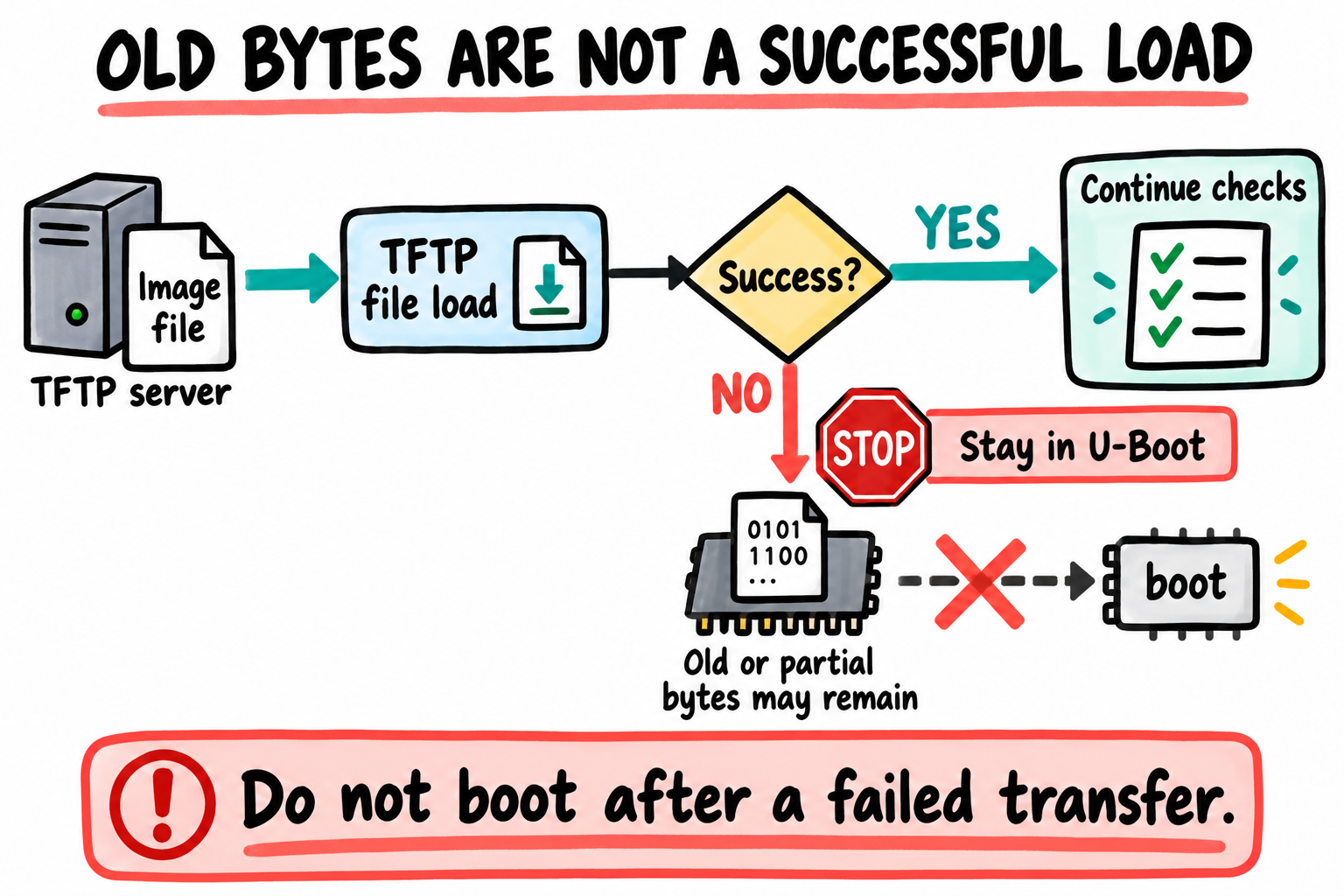
A failed transfer does not make its destination empty or trustworthy. Stop that boot path instead of using the bytes left behind. Every required file needs its own successful load.
Stage layout on the host
Where does the server look for a filename? In Chapter 3’s secure tftpd-hpa setup, /srv/tftp is the server root. The board requests a relative name such as mini-lab-r1/zImage, not a path into your home directory.
Do not symlink from that secure root to ~/imx6ull/src/linux. A chrooted server cannot follow that link outside its root, and user-directory permissions may block it even without a chroot. Instead stage a complete, identifiable artifact set in a new directory:
/srv/tftp/
    mini-lab-r1/
        zImage
        imx6ull-pa-mini.dtb
        artifacts.sha256
    known-good-r1/
        zImage
        imx6ull-pa-mini.dtb
known-good-r1 means artifacts with a recorded successful test on this exact board, not an EVK image renamed as a rescue set. The directory name records a lab artifact revision, not a Linux or U-Boot version.
After the matched kernel build and qualified MINI kernel DT from Part IV exist, use the build output directory rather than guessing an in-source path. These commands assume the modern kernel layout, ~/imx6ull/build/kernel/arch/arm/boot/dts/nxp/imx/, and a writable lab staging root from Chapter 3. An old vendor kernel commonly puts DTBs directly under arch/arm/boot/dts/; inspect the selected output and use its actual MINI filename/path, not these paths unchanged:
$ . ~/imx6ull/scripts/env.sh
$ test -r ~/imx6ull/build/kernel/arch/arm/boot/zImage
$ test -r ~/imx6ull/build/kernel/arch/arm/boot/dts/nxp/imx/imx6ull-pa-mini.dtb
$ mkdir /srv/tftp/mini-lab-r1
$ cp ~/imx6ull/build/kernel/arch/arm/boot/zImage /srv/tftp/mini-lab-r1/zImage
$ cp ~/imx6ull/build/kernel/arch/arm/boot/dts/nxp/imx/imx6ull-pa-mini.dtb /srv/tftp/mini-lab-r1/imx6ull-pa-mini.dtb
$ cd /srv/tftp/mini-lab-r1
$ stat -c '%n %s bytes' zImage imx6ull-pa-mini.dtb
$ sha256sum zImage imx6ull-pa-mini.dtb > artifacts.sha256
$ sha256sum --check artifacts.sha256
Stop on any failure. mkdir deliberately fails if that revision already exists: choose a new name instead of replacing artifacts during a load. Finish staging both files, check their sizes against the RAM plan, verify server readability, then select this directory at the board. The checksum manifest is a host record of the artifact pair, not automatic TFTP authentication or target verification. A FIT can keep the pair inside one container but is still unauthenticated unless signature policy is enforced.
TFTP from U-Boot
At a qualified U-Boot prompt, check help tftpboot, the selected Ethernet interface, and the temporary network settings. The v2026.04 command is tftpboot; abbreviated tftp is common, but the explicit name makes the helper easier to inspect:
=> setenv ipaddr 192.168.7.2
=> setenv serverip 192.168.7.1
=> setenv netmask 255.255.255.0
=> setenv gatewayip
=> setenv bootdir mini-lab-r1
=> setenv fdtfile imx6ull-pa-mini.dtb
=> setenv kernel_addr_r 0x82000000
=> setenv fdt_addr_r 0x83000000
=> ping ${serverip}
Clearing gatewayip is appropriate only for this direct-subnet example. MAC allocation, PHY routing, clocks and resets must already be qualified; do not copy an ethaddr from another board. The modern control DT aliases its sole enabled MAC, ENET2, as Ethernet 0; Linux interface naming is separate. Inspect actual enumeration. Inherited EVK ethprime=eth1 or vendor ethprime=FEC is not board validation.
For a transfer-only check, set a helper whose second load is gated by the first:
=> setenv netload 'if tftpboot ${kernel_addr_r} ${bootdir}/zImage && setenv kernel_size ${filesize}; then if tftpboot ${fdt_addr_r} ${bootdir}/${fdtfile} && setenv fdt_size ${filesize}; then true; else echo DTB transfer or size capture failed; false; fi; else echo Kernel transfer or size capture failed; false; fi'
=> run netload
Record the actual transfer status and sizes; no sample speed or success log is promised. filesize is replaced by each successful load. On failure, old data and size variables are not trustworthy. Do not issue a manual bootz just because buffers still contain something. Section 24.6 supplies the gated load + arguments + boot helper.
Speed
Measure on your actual link if transfer time matters. PHY link negotiation, TFTP options/block sizes, server scheduling, USB Ethernet adapters and file size all affect it. A rebuild still needs a new transfer and kernel restart; TFTP does not make an already running kernel change in place.
24.3 NFS for the rootfs
Export from the host
The rootfs is the filesystem mounted at /, containing programs, libraries and configuration. An NFS root moves its backing files onto the host. It does not turn arbitrary host binaries into Arm programs or supply missing target runtime libraries.
Use the rootfs preparation procedure from Part V before this step. An archive must be trusted and its numeric ownership, modes, symlinks and target ABI preserved in a dedicated tree. Extracting it as a normal user can lose ownership or fail on special files; extracting an unreviewed archive as root is unsafe. A directory listing containing bin and etc is not a functional-rootfs test. Check the selected init and its dependencies.
Inspect the existing host service configuration and active exports. These are inspection commands, not instructions to reconfigure or restart the host here:
$ systemctl status tftpd-hpa --no-pager
$ systemctl status nfs-kernel-server --no-pager
$ cat /etc/exports
$ sudo exportfs -v
$ ip -br address
$ ip route
A narrowly scoped export might look like this illustrative configuration, with you replaced by the real absolute path:
/home/you/imx6ull/rootfs 192.168.7.2(rw,sync,no_subtree_check,root_squash)
root_squash maps client root to an unprivileged server identity. It can work for readable files but prevents many root-owned writes. If the chosen development root requires client-root writes, no_root_squash is a deliberate exception granting the board substantial authority over that exported tree. Limit it to the single board address and isolated link, never *, and use a disposable dedicated rootfs. Do not export your home directory itself or weaken host-wide permissions to get past a mount error. See the server’s exports reference.
Changing exported file contents does not require restarting NFS or re-running exportfs. Changing the export definition does require an administrator’s reviewed reload, with existing exports preserved. Do not perform that reload merely to publish a rebuilt application. Keep a separate rootfs per concurrently running target so their runtime writes do not collide.
NFS-root from the kernel cmdline
Can Linux mount NFS before it loads a module from that same root? No. For direct kernel NFS-root without an initramfs, at least these capabilities and their dependencies must be built in (=y), not modules:
Kernel setting/capability |
Why it is needed before userspace |
|---|---|
|
Networking, IPv4 and early address configuration |
|
NFS client and root mounting |
|
Linux’s i.MX Ethernet path, independent of U-Boot’s driver |
Required pinctrl, clocks, regulator/reset providers and matched kernel DT |
Hardware dependencies for that Ethernet path |
|
A DHCP request cannot work from an option string alone |
For MINI V2.2, check the Linux driver against the actual SR8201F ID and this carrier’s reset/clock route. U-Boot’s Realtek ID match is not a test of the selected kernel driver. There may be further board/kernel dependencies. Verify them in the selected Part IV kernel .config and boot messages; the U-Boot config is not a substitute. An initramfs can supply modules and perform a different mount procedure, but then its /init owns that logic. An executable /init can prevent the direct nfsroot= path from being used.
For our static, direct-subnet example the final kernel command line is:
console=ttymxc0,115200 root=/dev/nfs nfsroot=192.168.7.1:/home/you/imx6ull/rootfs,vers=3,tcp ip=192.168.7.2:192.168.7.1::255.255.255.0:pa-mini:eth0:off rw
Replace the host path and confirm that eth0 is Linux’s intended interface. The first seven positional fields are:
ip=<client-ip>:<server-ip>:<gateway-ip>:<netmask>:<hostname>:<device>:<autoconf>
The empty gateway is intentional for this direct link. off disables automatic address discovery, not Ethernet. This is Linux configuration; it is not inherited automatically from U-Boot ipaddr. Optional later fields can specify DNS/NTP addresses. The Linux NFS-root reference explains the format and early-userspace caveat.
After a real boot, establish what mounted rather than looking for a fabricated welcome banner:
target# cat /proc/cmdline
target# cat /proc/mounts
target# cat /proc/net/pnp
target# uname -r
Find the / entry in /proc/mounts and check its source/type/options. The target# prefix means a target root shell, not a host command. Do not enter these at U-Boot.
Which files are needed before NFS is reachable?
Almost any file can be stored in an exported directory. The useful question is when that file becomes reachable:
The bootloader must run before this workflow can reach the NFS root. It comes from its qualified local/USB boot path.
U-Boot loads the kernel and kernel DTB using TFTP here. Their later copies in the NFS tree cannot retroactively change the running kernel or its initial DT.
Modules can live under
/lib/modules/<kernel-release>on NFS after root is mounted. They must match the running kernel; a module required to reach root must instead be built in or supplied by early userspace.Applications/configuration can be updated in the exported tree. NFS caching and application behavior determine when a process observes a change. A running executable does not become new code because its file changed; restart it deliberately.
Do not replace or delete the backing export directory while a target uses it. New module/rootfs sets belong in a staged tree and a controlled reboot plan, not a blind modules_install over a running system.
Speed and reliability
A wired development root keeps the network path independent of any Wi-Fi driver you are developing. If the link/server fails, a hard NFS mount may block filesystem accesses. Have serial access and a known-good local-root alternative; do not promise that every edit is visible immediately.
For a mount timeout, first check Linux link/PHY discovery, IP configuration, server route, export path/client permissions and RPC reachability. NFSv3 commonly needs rpcbind/mountd as well as the NFS port. TFTP also uses a transfer port beyond the initial UDP/69 request. A blanket rule for only UDP/69 and TCP/2049 may therefore be insufficient. Review interface/client-scoped firewall rules; do not disable the host firewall.
A temporary nfsrootdebug kernel parameter can expose the direct NFS-root choices. It is not nfsroot=...,debug, and nfs.callback_tcpport=0 is not a general v3 mount repair. rootwait does not repair a network link or NFS timeout. Version 3 here is an explicit lab choice, not a claim that NFSv4 is inherently unreliable.
24.4 USB-OTG recovery via uuu
If the local bootloader cannot start, TFTP cannot help: there is no U-Boot network stack running yet. The i.MX serial-download path can provide an earlier entry through ROM, provided the exact board has a routed USB download port, correct power/boot-mode straps and a compatible, qualified image. Switch labels and USB connector roles come from the supplied board schematic/manual, not the EVK’s switch positions.
Review a recovery recipe
There is no universal complete flashing recipe for a MINI here. Instead, review one supplied by the board owner before using it. NXP’s official examples distinguish downloading an i.MX6/7 bootloader from built-in scripts that write SD/eMMC. Our selected DCD/no-SPL image is not the SPL/SDPU sequence from a different board.
Use this review checklist, not a runnable placeholder script:
Stage |
Evidence required |
|---|---|
ROM discovery/SDP |
Exact SoC protocol, download-port routing, boot-mode selection, host USB access and cable |
Boot image download |
Board-qualified DCD/power/pads, image format, load/entry layout and any existing authentication policy |
U-Boot protocol transition |
Actual gadget/controller and command support; reaching a prompt does not automatically start Fastboot |
Optional persistent programming |
Explicit storage controller/area, partition map, offsets, actual byte/block counts, backup and read-back procedure |
Return to normal boot |
Documented strap restoration and a known-good image for this physical revision |
Fastboot commands need a bootloader built and configured for that USB gadget path. Neither Chapter 19’s baseline nor Chapter 22’s modern minimum is a ready-made manufacturing image. The modern minimum excludes USB; the vendor host stack is not proof of a configured Fastboot gadget. Check NXP’s U-Boot requirements and the actual v2026.04 config rather than assuming uuu adds missing firmware features.
A script containing FB: flash, mmc write, erases, or persistent environment saves changes storage even if its first operation only downloaded into RAM. Inspect every stage and any built-in recipe. Do not copy arbitrary block counts, wipe the first megabyte to simulate a fault, or burn fuses as part of a recovery example.
When to use it
Prepare recovery before changing the persistent bootloader. USB serial download is useful when the board’s qualified recovery path has been established; it is not a cure for an incorrect DDR sequence or a power fault. During ordinary kernel/userspace iteration, keep using the known-good bootloader and change only the intended artifacts.
A non-destructive reader example is to document how to select ROM download mode and identify the device without sending an image. Record the actual SoC/USB identifiers and host permissions. No USB transfer or recovery success is claimed in this chapter.
24.5 The canonical development loop
There are two loops now, not one magical live-update mechanism:
Kernel/DT source -> matched build -> new TFTP artifact directory
    -> gated U-Boot transfer -> kernel restart -> inspect actual logs

Userspace source -> target-ABI application/rootfs staging
    -> controlled update in the exported tree -> restart/read as appropriate
For a kernel change, reuse the selected config and output directory. CONFIG_LOCALVERSION is a useful deliberate identity set in the editor/menuconfig, unlike appending invalid text to a driver. Build kernel, DTBs and modules together:
$ . ~/imx6ull/scripts/env.sh
$ cd ~/imx6ull/src/linux
$ make O="$HOME/imx6ull/build/kernel" ARCH=arm \
    CROSS_COMPILE=arm-none-linux-gnueabihf- -j"$(nproc)" zImage dtbs modules
$ make O="$HOME/imx6ull/build/kernel" ARCH=arm \
    CROSS_COMPILE=arm-none-linux-gnueabihf- kernelrelease
Record the release, config, source revision and artifact hashes. Stage the next TFTP directory using Section 24.2. If modules changed, prepare them in a separate rootfs staging tree with the Part V procedure. For example, this writes only a chosen module staging directory, not the running export:
$ make O="$HOME/imx6ull/build/kernel" ARCH=arm \
    CROSS_COMPILE=arm-none-linux-gnueabihf- \
    INSTALL_MOD_PATH="$HOME/imx6ull/build/modules-next" modules_install
Review that output’s ownership/dependencies before deploying it. INSTALL_MOD_PATH is a host destination, not a target path. Compare the running target’s uname -r and module ABI/vermagic with the intended build after the controlled reboot.
For a configuration-file example, create a noncritical marker in the dedicated exported rootfs using your editor, then read it from the target. Do not choose credentials, init scripts or a currently executing binary for the first experiment. Record when the new content is observed; caching and a program’s own reload policy matter. No fixed transfer or edit-to-boot timing is promised.
24.6 Some useful U-Boot env helpers
Here is the full temporary network-root chain. These are U-Boot prompt commands, not env.sh contents. The example assumes the verified addresses, console route and Linux eth0 mapping already discussed. Replace nfspath with the actual existing export, and set bootdir only after its artifact pair is complete:
=> setenv serverip 192.168.7.1
=> setenv ipaddr 192.168.7.2
=> setenv netmask 255.255.255.0
=> setenv gatewayip
=> setenv hostname pa-mini
=> setenv netdev eth0
=> setenv console ttymxc0
=> setenv nfspath /home/you/imx6ull/rootfs
=> setenv bootdir mini-lab-r1
=> setenv fdtfile imx6ull-pa-mini.dtb
=> setenv kernel_addr_r 0x82000000
=> setenv fdt_addr_r 0x83000000
=> setenv nfsargs 'setenv bootargs console=${console},115200 root=/dev/nfs nfsroot=${serverip}:${nfspath},vers=3,tcp ip=${ipaddr}:${serverip}:${gatewayip}:${netmask}:${hostname}:${netdev}:off rw'
=> setenv devel_boot 'if run netload && run nfsargs; then bootz ${kernel_addr_r} - ${fdt_addr_r}; else echo Network load or arguments failed - staying in U-Boot; false; fi'
=> run devel_boot
Define netload exactly as in Section 24.2 first. netdev here supplies the Linux ip= field; it does not select U-Boot’s Ethernet device. nfsargs is a command helper, so run nfsargs expands its variables at execution time. An environment string containing ${serverip} is not recursively expanded just because another value refers to it.
Both run netload and run nfsargs must return success before bootz is reached. If constructing bootargs fails, stop at the prompt rather than booting with a previous command line. Keep the && gate when extending this helper.
For a later session-level autoboot choice:
=> setenv bootcmd 'run devel_boot'
Keep that assignment unsaved during bring-up. It does not alter Chapter 22’s disabled-autoboot delay on its own. Persistent autoboot is a separate product decision requiring a qualified environment backend, failure/recovery policy and deliberate delay settings. Chapter 22’s ENV_IS_NOWHERE migration cannot persist it; Chapter 19’s example patches also use RAM environment, unlike the unmodified vendor header.
For a modern one-shot local-root comparison, retain Chapter 23’s sdargs/sdboot and use run sdboot. For the vendor baseline, use its separate emmcargs/emmcboot, restoring the matched vendor-kernel DTB filename and verified root mapping. That helper obtains a real root partition UUID and gates all loads. Do not silently replace the NFS arguments with guessed /dev/mmcblk0p2 numbering or retain NFS arguments while testing a local root.
Failed-DTB case: If the DTB transfer fails while an earlier DTB remains in RAM, netload returns failure. devel_boot prints the error and stays in U-Boot. The old bytes are irrelevant to the decision.
24.7 Key Notes
TFTP loads boot payloads into RAM, NFS backs Linux’s root filesystem, and ROM USB download enters an earlier recovery stage. They solve different failures and have different prerequisites.
Linux owns Ethernet and IP configuration after handoff. Direct NFS-root needs the driver/provider, IP and NFS path before root is reachable, either built in or supplied by a deliberate initramfs design.
An immutable staged kernel/DTB set avoids mixed revisions during transfer. Hash records identify artifacts but do not authenticate TFTP or qualify the board they target.
Host exports, service bindings and firewall rules are persistent host policy. A narrow isolated export limits authority, especially when client-root writes justify
no_root_squash.Kernel replacement requires a new load and restart. NFS file changes have caching and process-lifetime consequences, and modules must match the running kernel.
uuumay cross from ROM download into writable bootloader protocols. A RAM download at the first stage does not make later flash, erase or environment-save commands harmless.
24.8 Pitfalls
The server works from the host but not from the board. Verify the physical-board route, service bind address and scoped firewall policy. WSL NAT and USB forwarding are separate concerns.
A secure-root symlink points into home. Stage real readable files under the TFTP root.
--securechanges the server’s filesystem root; it is not a setting that forbids all subdirectories.U-Boot ping passed, so Linux networking must work. Linux starts its own driver and IP setup. Check built-in dependencies and the kernel DT.
NFS root permissions fixed with a wildcard exception.
no_root_squashis an authority grant, not a universal mount prerequisite. Keep any justified exception to one board on an isolated link.Drivers are modules on the unreachable root. Build the boot-critical path in, or use an explicitly designed initramfs. An
/initchanges who mounts root.Old artifacts are mistaken for a new build. New directory names and hashes make staging traceable. Check running release/module compatibility, not a fabricated log date.
uuurecipe assumed harmless. Inspect protocol transitions and writes. A ROM download and a Fastboot storage write are different operations with different prerequisites.Network timeouts treated as block-device delay.
rootwaitis not a PHY/NFS fix. Investigate the failing network stage and retain serial/recovery access.
24.9 Going deeper
Use the Linux NFS-root guide for ip=, nfsrootdebug and early-userspace behavior. Read your installed tftpd-hpa manual and exports manual alongside the actual Chapter 3 service files; the linked manuals describe options, not proof of your installed service version/configuration.
NXP’s UUU examples and U-Boot requirements explain the tool/protocol boundary. Check a board-owner recipe against your pinned U-Boot build before any future recovery operation.
The core path now has a concrete test for each boundary: a versioned bootloader build, a hardware-qualified port, checked artifact loads, a kernel handoff and an observed root mount. The source/build examples alone do not establish all five. Keep their remaining evidence requirements visible as you move into Linux and rootfs development.
Next chapter: Chapter 24A: Building i.MX6ULL U-Boot from nothing. That optional deep dive changes the level of platform work. It is not a requirement to replace the working, qualified bootloader during ordinary kernel iteration.